




How to laser cut cast acrylic cleanly (the checklist)
Updated Oct 2026TL;DR: A clean cast acrylic cut has a glass-like flame-polished edge that needs no post-processing. Getting there is a five-item checklist: clean optics, correct focus, the right power and speed, masking on, and tuned air assist. This article walks each one and shows you what a clean cut looks like.
What a clean cut looks like

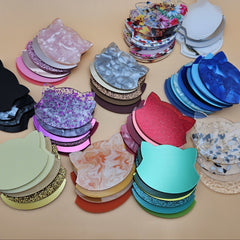
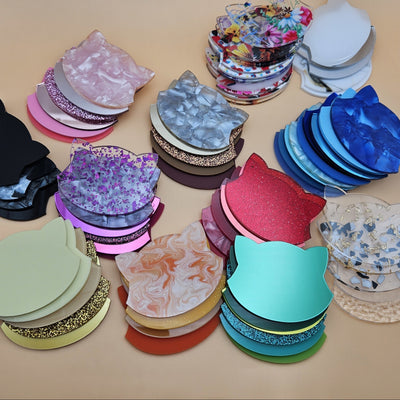
Fine bridges and tight inside corners are the real test of a clean cut: every piece dropped out without breaking or melting together.
Before diving into how, set the benchmark. A clean cast acrylic cut on 3 mm material:
- The edge feels smooth to a fingernail, with no ridges or fuzz.
- Under raking light, the edge is glossy and slightly rounded (the flame-polished effect). It catches the light like a piece of moulded plastic, not a sawn one.
- There is no visible cone or bevel across the thickness of the cut.
- The face is free of soot or condensate, because the masking was on during the cut.
That is the target. Anything less than that means one of the five items below is off.
The five-item checklist
Step 1: Clean the focusing lens and mirrors.
A film of smoke residue on the underside of the lens absorbs 5 to 30 percent of the beam. That much loss turns a clean cut into a hazy one and a 3 mm cut-through into a 2.5 mm score.
How to check: pop the lens out (when the laser is off and cool). Hold it up to a light. Smudges, films, or fogginess are visible.
How to clean: a drop of pure isopropyl alcohol on a lens-grade wipe (cotton swab works for small lenses, lens tissue for larger). Wipe in one direction. Do not scrub.
Frequency: every 10 to 20 hours of cutting, or whenever cut quality drops without a settings change.
Step 2: Set focus correctly.
For most cast acrylic work, set focus at the top of the material. This gives the cleanest top edge (which is the visible edge on most projects) and accepts a slight flare at the bottom.
For projects where both faces matter equally (boxes, snap-fits), focus at mid-thickness.
For thick acrylic where the bottom face is the visible face, focus at the bottom.
The exact mechanics differ by machine. Manual focus uses a focus tool or a feeler gauge. Automatic focus probes the material and adjusts the bed. Whichever you have, do not skip this step between material thicknesses.
Step 3: Use the right power and speed.
The settings starting points above are for cast acrylic on common machines. Some general principles:
- For a clean cut, run at full power and adjust speed to control how much energy reaches the bottom of the cut. Faster speed means less energy per millimetre, less flame polish.
- For a frosted cut (a satin matte edge), run multiple passes at low power instead of one pass at high power.
- If the cut leaves uncut bridges, reduce speed by 10 to 20 percent before adding a second pass. A single slow pass beats two fast ones for edge quality.
Step 4: Keep the masking on during the cut.
Cast acrylic ships with paper or polyethylene masking on both faces. Most beginners want to peel it off before cutting to "see better". Do not. The masking has two jobs during a cut:
- It protects the face from condensate (the vaporised acrylic that rises out of the cut and re-deposits as a haze on the surface).
- It prevents air-assist deflection from blowing fumes sideways onto the face.
Cut through the masking. Peel afterward.
If the masking has lifted or detached on parts of the sheet, weight it back down with low-tack tape or tab the corners. A flapping piece of masking deflects air assist.
Step 5: Tune air assist.
Air assist does three things during a cast acrylic cut: clears fumes out of the kerf, cools the edge slightly, and reduces flame-up risk.
For cast acrylic specifically:
- 15 to 25 psi at the nozzle is the right range for most cuts.
- Higher pressure (25 to 35 psi) on thick acrylic (6 mm and up) to keep the deep kerf clear of fumes.
- Lower pressure (10 to 15 psi) on thin acrylic (1.5 mm) where high pressure can flutter the material.
- For the cleanest flame-polish finish, run the air on the lower end of the range. More air cools the edge faster, reducing how much it slumps and polishes.
There is no single right pressure. Run a test cut with the air set at three different pressures and pick the cleanest result. Note it down.
Common edge defects and what causes them
When the edge is not clean, it is one of the five items above. Walk through them in order: optics, focus, settings, masking, air assist. The answer is in there 95 percent of the time.
Hazy or frosted edge when you wanted glass-clear. Almost always lens cleanliness or speed too fast. Clean the lens, then drop the speed by 10 percent.
Sooty black film on the face after peeling masking. Masking was off during the cut, or air assist was too high and deflected fumes onto the face. Re-mask and recut.
Visible kerf taper (the bottom edge wider than the top). Focus was at the top with the material too thick for that focus point. Either drop focus to mid-thickness or accept the taper.
Charred or burned-looking edge. Settings are too aggressive: power too high, speed too slow, or both. Cast acrylic does not char in a clean cut. If you see char, the energy density was wrong.
Uneven kerf width across the bed. Material is not flat, or the bed is sagging. Check flatness with a straightedge. Re-level if needed.
Microscopic cracking along the cut edge. Stress lines from internal stress in the sheet. More common in extruded than cast. If you see this on a sheet you bought as cast, it is probably extruded mis-labelled. See cast vs extruded acrylic.
After the cut

Clean, square edges matter most when parts are stacked or glued, because the edge is what the next layer sits against.
Peel the masking slowly. Pull at a shallow angle, parallel to the surface. Pulling straight up risks micro-stressing the cut edge.
Adhesive residue on the face. Some maskings leave a faint residue. Wipe with a paper towel slightly dampened with mild dish soap and water. Avoid alcohol on the face of cast acrylic; it can micro-craze the surface.
Bonding readiness. Cleanly cut cast acrylic is ready for solvent welding directly. The cut edges are already flat and the surface chemistry takes acrylic solvent cement well. See best glues for acrylic for the full breakdown.
Safety
All laser cutting requires active fume extraction, on every material. Cast acrylic fumes contain methyl methacrylate monomer, which is an eye and respiratory irritant. A purpose-built extractor venting outside, or a closed-loop filtration unit rated for laser fumes, is required equipment. Never leave a cut unattended; acrylic does not flame as easily as wood but a fault condition can still start a fire.
Frequently asked questions
Q: My new tube cut beautifully last month and now the edge is hazy. What changed? A: Almost always the lens. Smoke residue builds up gradually on the underside of the focusing lens. Clean it. If that does not fix it, check the mirrors on CO2 machines.
Q: Can I get a flame-polished edge on extruded acrylic? A: Sometimes, with luck and tuned settings, but not reliably. The lower molecular weight of extruded acrylic gives a hazier cut. If you need a flame-polished edge, source cast.
Q: What lens focal length is best for cast acrylic? A: 2 inch (50.8 mm) is the most versatile and what most CO2 machines ship with. 1.5 inch gives a tighter focus for fine detail but less depth of field. 4 inch is for thick material (12 mm and up).
Q: My piece looks great at the start of the cut and worse at the end. Why? A: Bed or material warping during the cut, or the lens fogging up from accumulated fumes. Use a hold-down. Check the lens between long cuts.
Q: Can I cut clear cast acrylic with a diode laser? A: Clear, no. Diode light (450 nm) passes through clear acrylic without absorbing. Coloured cast acrylic, yes, depending on the colour.
Q: How thin can a feature be before the cut destroys it? A: On 3 mm cast acrylic, features below about 1.5 mm wide will heat-warp during the cut and may not survive cleanly. The minimum safe feature width scales with thickness; for 6 mm material, keep features at least 3 mm wide.